- The Anatomy of VUI: Understanding the Tech Stack
- Core Design Principles: The Psychology of Conversation
- Designing the Conversation
- Interaction Guidelines & Logic
- Handling Errors (The "No Match" Scenarios)
- The Ultimate VUI Design Checklist
- FAQ: Voice User Interface Design
- 1. What is the difference between VUI and IVR?
- 2. Do I need to code to design VUI?
- 3. What is a "Wizard of Oz" test in VUI?
- 4. How do I improve VUI discoverability?
- 5. What is an "Utterance"?
- 6. Why is "Barge-in" important?
- 7. How does VUI impact SEO?
- 8. What is Multimodal Design?
- 9. How do I handle accents in VUI?
- 10. What represents a "Slot" in VUI?
- 11. Is VUI accessible?
- 12. What tools are best for VUI prototyping?
- 13. What is "Earcon"?
- 14. How long should a VUI response be?
- 15. What is the biggest mistake in VUI design?
Introduction
With the proliferation of smart speakers like Amazon Echo and Google Nest, alongside the ubiquity of Siri and mobile voice assistants, Voice User Interface (VUI) design has graduated from a novelty to a critical skill set. However, designing for the ear is fundamentally different from designing for the eye. It requires a shift in mindset from pixels to phonemes, from screen flows to conversation scripts.
This guide serves as a comprehensive resource for modern designers. We will dissect the anatomy of voice technology, explore the psychology of conversation, and apply rigorous User Interface Design principles to build helpful, human-centric voice experiences.
The Anatomy of VUI: Understanding the Tech Stack
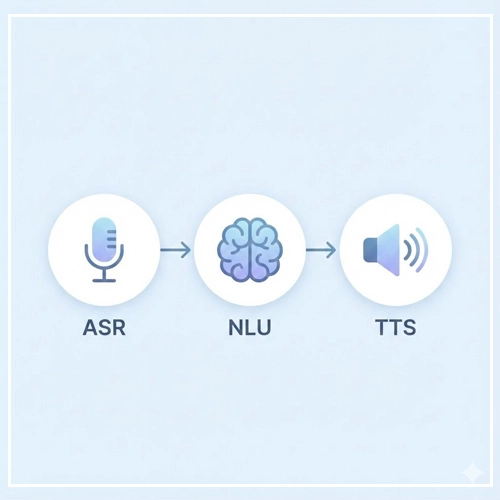
To design effectively, one must understand the medium. You do not need to be an engineer, but you must understand the constraints and capabilities of the technology powering your design. A Voice User Interface relies on a specific pipeline of technologies to function.
1. Automatic Speech Recognition (ASR)
What is ASR?
Automatic Speech Recognition is the technology that takes the raw audio wave produced by the user’s voice and transcribes it into text. It is the “ears” of the machine.
- Design Implication: ASR is imperfect. It struggles with accents, background noise, and homophones (e.g., “red” vs. “read”). VUI designers must anticipate these failures and design “repair paths” to handle misheard words.
2. Natural Language Understanding (NLU)
What is NLU?
Once ASR turns sound into text, Natural Language Understanding deciphers what that text means. It breaks the sentence down into two main components:
- Intents: What the user wants to do (e.g.,
PlayMusic,SetAlarm). - Slots (or Entities): The specific variables within that request (e.g.,
Jazz,7:00 AM). - Design Implication: You are not designing screens; you are designing logic. You must map out all the different ways a user might phrase an Intent.
3. Text-to-Speech (TTS)
What is TTS?
Text-to-Speech is the process of converting the system’s text response back into synthesized speech. This is the “voice” of the assistant.
- Design Implication: The quality of TTS varies. Designers must write scripts that sound natural when spoken by a robot, avoiding tongue twisters and awkward phrasing.
Core Design Principles: The Psychology of Conversation
When users interact with a GUI, they scan. When they interact with a VUI, they listen. This shift requires us to lean heavily on the principles of linguistics and cognitive psychology.
Grice’s Maxims: The Rules of Cooperative Conversation
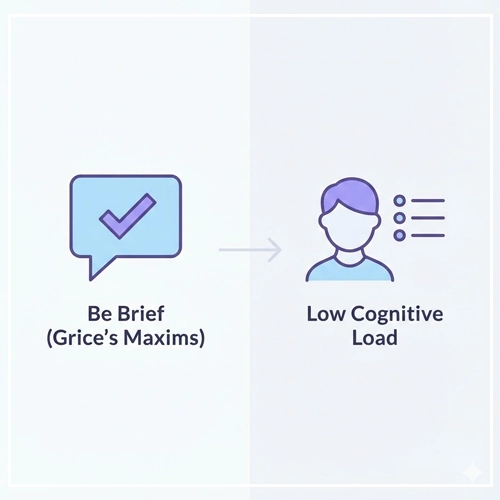
In 1975, philosopher Paul Grice proposed the “Cooperative Principle,” suggesting that effective communication relies on four specific maxims. As a Voice User Interface designer, adhering to these is non-negotiable for creating an authoritative and helpful persona.
1. The Maxim of Quantity
Rule: Be as informative as required, but no more.
- In VUI: Users cannot “skim” audio. If Alexa reads a Wikipedia paragraph when the user asked for a date, the experience fails.
- Bad: “The weather in New York is currently 72 degrees with a humidity of 40%. It looks like it might rain later, but right now it’s partly cloudy and the wind is blowing…”
- Good: “It’s 72 degrees and partly cloudy in New York.”
2. The Maxim of Quality
Rule: Do not say what you believe to be false or that for which you lack evidence.
- In VUI: Trust is fragile. If a voice assistant hallucinates information (common in early LLM integrations), the user will abandon the tool.
- Application: If the system is unsure, it is better to say “I don’t know” or ask a clarifying question than to guess.
3. The Maxim of Relation
Rule: Be relevant.
- In VUI: Context is king. If a user says “Book a table,” and the system asks “What represents your favorite color?”, the interaction is broken.
- Application: Ensure the system’s response logically follows the user’s prompt (Adjacency Pairs).
4. The Maxim of Manner
Rule: Be clear, brief, and orderly. Avoid ambiguity.
- In VUI: Since audio is linear, list items must be short.
- Application: Put the most important information at the end of the sentence (the “recency effect”) so the user remembers it.
Cognitive Load in Audio Interfaces
Visual interfaces allow users to offload memory; the menu is always visible on the screen. In VUI, the menu is invisible. This creates a high cognitive load because the user must remember what they can say.
- The Rule of 3: Never offer more than three options in a voice menu.
- Linearity: Users cannot “go back” easily in a conversation. The path must be forward-moving.
Comparison: GUI vs. VUI Design Patterns
| Feature | Graphical User Interface (GUI) | Voice User Interface (VUI) |
| Interaction Style | Explicit, Direct Manipulation | Conversational, Turn-Taking |
| User Memory | Low Load (Recognition over Recall) | High Load (Recall over Recognition) |
| Information Density | High (Visual Scanning) | Low (Linear Listening) |
| Error Recovery | Visual Undo/Back Button | Verbal Repair Loops |
| Discoverability | Menus, Icons, Hovers | “What can you do?”, Prompts |
Designing the Conversation
Designing a Voice User Interface is essentially screenwriting. Before you write a single line of code, you must write the script.
Creating a Persona
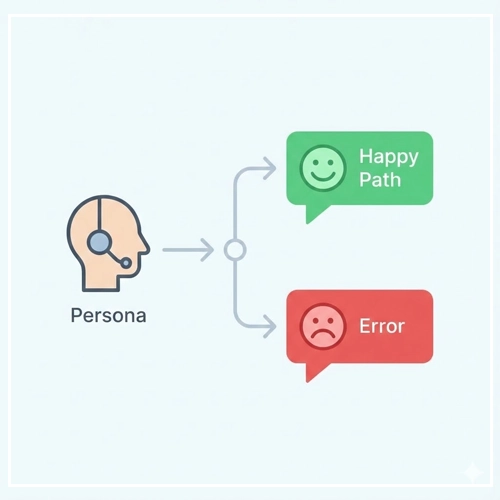
Who is talking to the user? A banking app should sound professional and secure. A children’s game should sound energetic and simple.
- Tone: The attitude of the voice (e.g., Cheerful, Serious).
- Voice: The personality (e.g., Helpful Librarian, Efficient Butler).
- Diction: The vocabulary choice (e.g., “Okay” vs. “Affirmative”).
Sample Dialogs and “Happy Paths”
The “Happy Path” is the ideal interaction where the user says exactly what you want, and the system functions perfectly.
Scenario: User wants to order coffee.
User: “I’d like a large Latte.”
System: “Okay, a large Latte. Would you like that hot or iced?”
User: “Hot, please.”
System: “Got it. One large hot Latte coming up. It will be ready in 5 minutes.”
However, humans rarely stick to the script. This leads us to the necessity of writing natural scripts that account for variations.
[Link to: Conversational UI Design: Writing Natural Scripts]
Visual Feedback in Multimodal Interfaces
Modern VUI often lives on devices with screens (Smart Displays, Smartphones). In these cases, User Interface Design requires a “Voice-Forward, Visual-Supported” approach.
- Visual Cues: When the user is speaking, show a listening animation.
- Complementary Info: If the voice says, “Here are three Italian restaurants,” the screen should show the star ratings and maps, preventing the voice assistant from having to read out addresses.
[Link to: Visual Feedback for Voice Interactions]
Interaction Guidelines & Logic
Once the script is written, we must apply interaction logic to ensure the system behaves consistently.
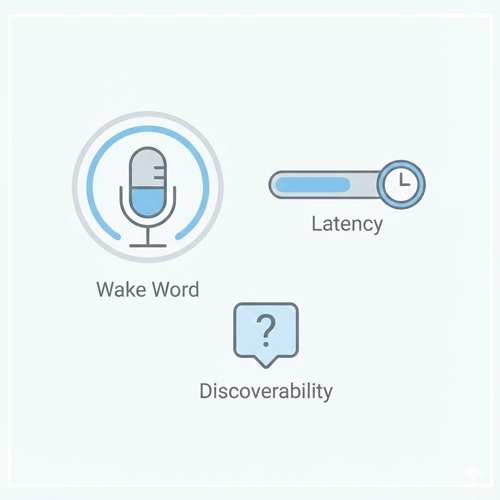
Turn-Taking and the “Wake Word”
Conversation is a game of catch. In VUI, we use specific markers to indicate whose turn it is.
- Wake Word: “Hey Google” or “Alexa” triggers the system.
- End-of-Speech Detection: The system must listen for a pause to know the user is done.
- Barge-In: Ideally, users should be able to interrupt the system if it is rambling. This is technically difficult but essential for a natural feel.
Discoverability: The “What Can I Say?” Problem
In an app, you can see a “Settings” gear icon. In VUI, that icon doesn’t exist. How does the user know they can change settings?
- Implicit Confirmation: “I’ve set your alarm for 7 AM.” (Confirms the action).
- Explicit Instruction: “You can say ‘Change time’ or ‘Cancel’.” (Teaches the user commands).
- Contextual Hints: If a user fails twice, offer a specific suggestion: “I didn’t catch that. You can ask me to play jazz or blues.”
[Link to: VUI Design Principles for Smart Speakers]
Latency and “Thinking” Time
Silence in a conversation is awkward. Silence in a VUI feels broken.
- Immediate Acknowledgment: If the system needs 3 seconds to fetch data, play a sound (Earcon) or have the voice say, “Let me check that for you…” immediately.
- Tapering: Don’t use “thinking sounds” for short tasks, only for heavy processing.
Handling Errors (The “No Match” Scenarios)
The true test of a Senior VUI Designer is not how they design success, but how they design failure. In Voice User Interface design, errors are frequent due to background noise, accents, or users asking for unsupported features.
Designing for Ambiguity
Sometimes users provide incomplete information.
- User: “Book a flight to London.”
- System (Ambiguity Check): “London, England, or London, Ontario?”
This is called Slot Filling. The system identifies the intent (BookFlight) but is missing a required variable (Destination_City_Disambiguation).
Reprompts and Escalations
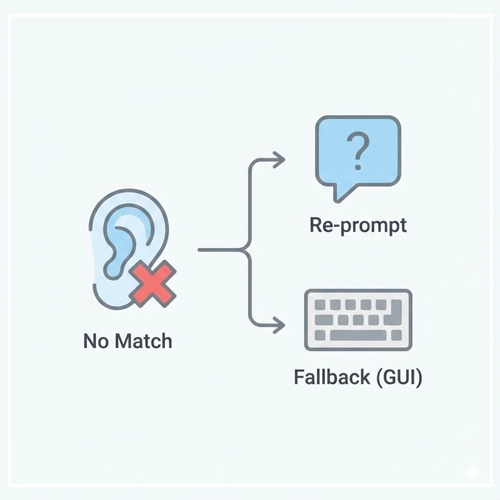
When the system hears nothing (Time-out) or gibberish (No Match), you cannot simply repeat “I didn’t understand.” You must escalate the helpfulness.
- First Error: “I’m sorry, I didn’t catch that.” (Generic).
- Second Error: “I’m having trouble hearing you. Please say the city name, like ‘Paris’ or ‘New York’.” (Specific Instruction).
- Third Error: “I still can’t hear you. I’ve sent a list of destinations to your app.” (Failover to GUI).
[Link to: Handling Errors in Voice User Interfaces]
Context Awareness
A truly smart UI remembers what was just said.
- User: “Who is the President of France?”
- System: “Emmanuel Macron.”
- User: “How old is he?”
- System: “He is 46 years old.”
The system must understand that “he” refers to the entity “Emmanuel Macron” from the previous turn. This is vital for maintaining the flow without forcing the user to repeat themselves.
[Link to: Voice Search Optimization for Mobile Apps]
The Ultimate VUI Design Checklist
Before handing your design off to developers, run it through this checklist to ensure it meets high-quality User Interface Design standards.

1. The “One Breath” Test
- [ ] Can all system responses be read aloud comfortably in one breath?
2. The Persona Check
- [ ] Does the assistant sound consistent? (e.g., It doesn’t switch from slang to formal legalese).
3. The Gricean Audit
- [ ] Quantity: Is the information concise?
- [ ] Quality: Is the information accurate?
- [ ] Relation: Is the answer relevant to the query?
- [ ] Manner: Is it easy to understand?
4. Error Handling
- [ ] Have you scripted a “No Input” response (User says nothing)?
- [ ] Have you scripted a “No Match” response (System doesn’t understand)?
- [ ] Do you have a failover strategy (Handing off to a human or screen)?
5. Cognitive Load
- [ ] Are lists limited to 3 items?
- [ ] Is the most important information placed at the end of the sentence?
Conclusion: The Future of Voice
Voice User Interface design is no longer just about smart speakers. It is moving into our cars, our wearables, and our homes via ambient computing. As Artificial Intelligence and Large Language Models (LLMs) continue to evolve, VUI will become more conversational, more contextual, and less robotic.
However, the core principles of User Interface Design remain the same. We must design for humans. We must respect their time, reduce their cognitive load, and guide them through the experience with empathy and clarity. By mastering VUI today, you are future-proofing your career for the next decade of interaction design.
FAQ: Voice User Interface Design
1. What is the difference between VUI and IVR?
VUI (Voice User Interface) usually refers to modern, AI-driven conversational agents (like Alexa). IVR (Interactive Voice Response) refers to older telephone menu systems (“Press 1 for Sales”), which are generally rigid and linear.
2. Do I need to code to design VUI?
No. While understanding logic is helpful, you can design VUI using flowchart tools, scripts, and prototyping platforms like Voiceflow or Figma without writing raw code.
3. What is a “Wizard of Oz” test in VUI?
It is a testing method where a human sits behind the scenes and generates the system’s voice responses in real-time to test the script with a user, simulating a working AI.
4. How do I improve VUI discoverability?
Use “contextual onboarding.” When a user completes a task, briefly mention a related feature. E.g., “Alarm set. By the way, I can also wake you up to music.”
5. What is an “Utterance”?
An utterance is anything the user says to the system. It is the raw vocal input before it is processed into an intent.
6. Why is “Barge-in” important?
Barge-in allows users to interrupt the system while it is speaking. It makes the interaction feel faster and more natural, giving the user control.
7. How does VUI impact SEO?
Voice search queries are often longer and conversational. To rank, content must answer specific questions (Long-tail keywords) and use structured data schema.
8. What is Multimodal Design?
It is the practice of designing interfaces that use multiple modes of input/output simultaneously, such as voice, touch, and visuals (e.g., an Echo Show).
9. How do I handle accents in VUI?
You cannot “design” for accents in the script, but you can choose robust ASR engines and design error messages that are patient and offer alternative input methods (like typing).
10. What represents a “Slot” in VUI?
A slot is a variable within a user’s intent. In the phrase “Play Jazz music,” “Play” is the intent, and “Jazz” is the slot (genre).
11. Is VUI accessible?
Yes, VUI is critical for accessibility, particularly for users with motor impairments or visual impairments who cannot use traditional screens.
12. What tools are best for VUI prototyping?
Voiceflow is currently the industry standard. Other tools include ProtoPie (for multimodal) and Adobe XD.
13. What is “Earcon”?
An Earcon is a brief, distinctive sound used to represent a specific event or convey information, like the “ding” when Siri starts listening.
14. How long should a VUI response be?
Ideally, no longer than it takes to convey the necessary information. For conversational turns, aim for under 3-5 seconds of speech unless the user requested a long-form reading (like a news briefing).
15. What is the biggest mistake in VUI design?
The biggest mistake is “Visual VUI”—trying to read a visual menu out loud. Voice interfaces require a completely different information architecture than screens.